
Field teams are the link between a company’s strategy and what actually happens in the market. Yet, managing them is difficult when managers cannot see field activity in real time. Missed visits, inefficient routes, delayed reports, unverified attendance, and poor territory coverage can quietly affect sales performance.
Field force tracking software helps solve these problems by giving businesses visibility into employee locations, customer visits, routes, attendance, and field activities. But choosing the right platform is not simply about finding a solution with GPS tracking.
This guide explains how field force tracking software works, its key features and benefits, what to check before buying, and how to measure its ROI.
What Is Field Force Tracking Software?
Field force tracking software is a digital platform that helps businesses monitor, manage, and improve the activities of employees who work outside the office. It uses technologies such as GPS, geo-tagging, geo-fencing, mobile applications, and real-time reporting to give managers visibility into field operations.
A typical field force tracking system allows managers to know where their employees are, which customers they have visited, how long they stayed, and whether planned activities were completed. Depending on the platform, it can also track attendance, routes, orders, collections, service calls, photographs, and follow-ups.
However, field force tracking is more than employee location monitoring.
The real value comes from connecting location data with field activity and business outcomes. For example, knowing that a sales representative visited ten outlets is useful. Knowing that eight of those visits were productive, generated five orders, covered a specific territory, and required less travel time is far more valuable.
This is why modern field force management software combines GPS tracking with visit planning, beat management, sales automation, analytics, and reporting.
For businesses with distributed sales or service teams, it provides managers with a structured way to monitor execution, identify gaps, and make faster decisions.
How Does Field Force Tracking Software Work?
The process usually starts with setting up employees, territories, customers, outlets, routes, and daily activities inside the system.
Field sales representatives then use a mobile app to mark attendance, begin their day, follow assigned routes, and complete scheduled visits. GPS and geo-tagging capture location information during relevant activities. Where required, geo-fencing can verify whether an employee is physically present at an approved location.
During a visit, employees can record orders, customer interactions, service updates, photographs, stock information, collections, or other activities. The information then syncs with the manager’s dashboard. Managers can compare planned versus actual visits, review territory coverage, identify missed activities, and measure individual or team performance.
If the application supports offline functionality, representatives can continue recording activities without an internet connection. The data syncs when connectivity returns.
This creates a complete field workflow:
Plan → Track → Visit → Capture → Analyze → Improve
Key Features of Field Force Tracking App
The Best field force tracking app should do more than display employee locations on a map. Look for features that connect field movement with actual work and measurable outcomes.
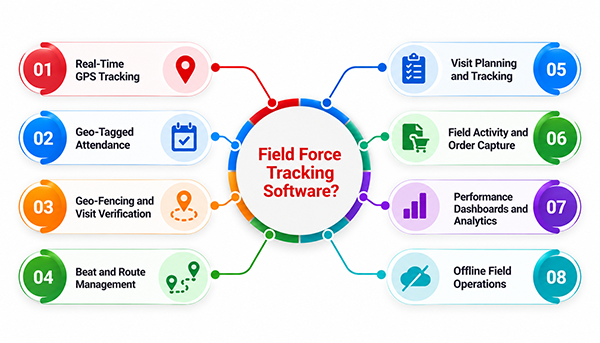
1. Real-Time GPS Tracking
Real-time GPS tracking gives managers visibility into where field employees are during working hours. It can help supervisors understand movement across territories, monitor planned routes, and identify unusual travel patterns.
However, GPS tracking becomes much more useful when connected to business activities. Managers should be able to see not only an employee’s location but also the customer being visited and the activity completed there.
When evaluating software, check GPS accuracy, location refresh rates, battery consumption, and how the system handles weak GPS signals. These practical details can significantly affect day-to-day usability.
2. Geo-Tagged Attendance
Field teams rarely start their day from a fixed office. This makes traditional attendance systems difficult to use and verify. Geo-tagged attendance allows employees to mark attendance through a mobile application while recording their location and time. Managers can then verify whether attendance was marked from an appropriate location.
Some platforms also support additional verification methods, including facial recognition or configurable attendance rules. This reduces dependency on manual attendance records and creates a more reliable field attendance trail. It also gives managers a clearer view of when representatives actually begin and end their field activities.
3. Geo-Fencing and Visit Verification
Geo-fencing creates a virtual boundary around a specific customer, outlet, office, or service location. When an employee checks in, the system can verify whether they are within the permitted geographical area.
This is particularly useful for businesses that need reliable proof of customer visits. For example, a representative may be required to visit a retailer and complete an outlet audit. Geo-fencing can verify physical presence while the application records the activity.
A good system should allow businesses to configure geo-fencing rules rather than applying one rigid distance across every location.
4. Beat and Route Management
Poor route planning can consume a surprising amount of a field employee’s working day. Route planning software helps businesses organize customers or outlets into defined routes and recurring visit plans. Managers can assign representatives specific beats based on territory, customer type, visit frequency, or business priorities.
Route management can then help employees follow a more practical sequence of visits. The objective is not simply to increase the number of locations covered. It is to reduce unnecessary travel and create more time for productive customer interactions.
5. Visit Planning and Tracking
Field reps often have a list of customers to visit, but without a structured system, planned activities can easily become inconsistent.
Visit planning allows managers to schedule customers, outlets, or tasks in advance. The system can then compare planned visits with actual execution. Managers can identify completed, missed, rescheduled, and productive visits. They can also review visit duration and frequency.
This makes it easier to identify coverage gaps before they become recurring problems. For field sales teams, the feature becomes even more useful when visits are connected with orders, follow-ups, collections, or other measurable outcomes.
6. Field Activity and Order Capture
A field force tracking platform should ideally allow employees to complete their work from the same mobile application. Depending on the business, representatives may capture orders, leads, customer information, stock levels, payments, photographs, surveys, or merchandising data during a visit.
This eliminates much of the manual work involved in creating reports after returning from the field. For sales teams, integrated order capture is particularly valuable because managers can connect field visits with actual sales activity. The result is better visibility from customer interaction to commercial outcome.
7. Performance Dashboards and Analytics
Tracking thousands of field activities is not useful if managers still have to interpret spreadsheets manually. Analytics dashboards convert field data into measurable performance indicators.
Managers can monitor metrics such as visit compliance, territory coverage, productive calls, attendance, sales performance, travel time, target achievement, and planned-versus-actual activity.
The best dashboards allow users to move from a high-level view to specific territories, employees, customers, or visits. This helps managers identify where performance is falling behind and investigate the underlying reason instead of relying on assumptions.
8. Offline Field Operations
Connectivity cannot be guaranteed everywhere. Field employees may work in rural markets, basements, warehouses, highways, or locations with unreliable mobile networks. If the application stops working whenever connectivity drops, adoption becomes difficult.
An offline field force tracking app allows employees to capture essential activities without an active internet connection. Orders, visits, photographs, or other information can be stored locally and synchronized once connectivity returns.
When evaluating vendors, test this capability yourself. Turn off mobile data during a demonstration and complete a complete field workflow. A genuine offline experience should work without forcing employees to repeat their work.
What Should Field Force Tracking Software Measure Beyond Location?
For FMCG, CPG, and FMCD businesses, knowing where sales representatives are is only one part of the best field force tracking. True field visibility shows how effectively teams execute activities, cover outlets, convert visits into orders, and drive secondary sales. The right metrics connect field activity with sales execution and help managers identify performance gaps.
| Field Performance Metric | What It Tells You | Why It Matters |
| Beat Plan Compliance | Shows whether representatives are covering assigned outlets according to planned beats and visit schedules. | Helps managers identify missed outlets, improve servicing consistency, and maintain stronger market coverage. |
| Outlet Coverage | Tracks how many planned or active outlets are actually visited within a defined period. | Reveals coverage gaps and helps businesses improve distribution reach across territories and markets. |
| Productive Visit Ratio | Measures how many completed outlet visits result in an order or another defined sales outcome. | Helps distinguish meaningful sales calls from simple visit completion and indicates the effectiveness of field execution. |
| SKU Lines per Order | Measures the average number of different SKUs sold during a productive outlet visit. | Shows how effectively representatives are expanding assortment, improving SKU penetration, and identifying cross-selling opportunities. |
| In-Store Execution Compliance | Tracks execution of merchandising standards, product availability, shelf visibility, promotional activities, displays, and other retail execution requirements. | Helps brands understand whether agreed market and merchandising standards are being executed consistently at the outlet level. |
| New Outlet Acquisition | Tracks new retailers or customers added by field representatives within their assigned territories. | Provides visibility into distribution expansion and shows whether teams are actively increasing the brand’s market reach. |
| Secondary Sales Contribution | Measures secondary sales generated within a representative’s assigned territory or outlet network. | Connects field activity with commercial results and helps managers understand the sales impact of field execution. |
| Visit Effectiveness | Evaluates what happens during an outlet visit, including time spent, activities completed, retailer interaction, audits, orders, and follow-ups. | Helps businesses evaluate the quality of a visit, rather than relying only on check-ins or the total number of calls completed. |
Real-World Use Cases
Field force tracking application plays out differently depending on the industry.
FMCG, Food and Beverages: Companies managing thousands of SKUs across scattered geographies need synchronized visibility between sales execution and stock movement. Parle Agro, for instance, used this kind of real-time tracking to bring outlet-level reporting accuracy to 95% and cut stock replenishment time by 80%, replacing what used to be a fragmented, delayed view of distributor performance.
Distribution networks: For businesses running large distributor networks, the priority shifts to national-level coverage. One dairy and beverage company, Amrit Foods, used field tracking and route optimization to expand outlet coverage significantly across a distributor network spanning thousands of points, while keeping the system reliable in areas with poor connectivity.
Pharma and specialty sales: Field teams in pharma often manage complex product hierarchies and compliance requirements. Here, tracking needs to handle multiple business divisions without breaking down as the product catalog grows.
Industrial and B2B sales: Technical field sales teams benefit less from raw visit counts and more from demand pattern visibility, knowing which industrial zones are ready for a pitch and which need more nurturing.
Common Challenges During Rollout
Buying the software is the easy part. A few things trip up most rollouts.
Adoption resistance. Field sales reps who’ve worked a territory for years don’t always welcome a system that logs their movement. Framing it as a tool that reduces their admin burden, not one that monitors them, matters more than any feature list.
Connectivity gaps. If the app can’t function offline and sync later, coverage in remote areas suffers immediately.
Integration debt. A tracking tool that doesn’t talk to your ERP or existing DMS just creates another data silo. Ask about integration depth, not just integration existence.
Change management at scale. Rolling out to 50 reps is different from rolling out to 5,000 across multiple countries. Ask vendors directly how many large-scale, multi-country rollouts they’ve actually managed.
How to Evaluate Vendors: A Practical Checklist
Before signing anything, get clear answers on:
- Does the platform work fully offline, with automatic sync once connectivity returns?
- Can it handle multiple business divisions and product hierarchies without custom workarounds?
- Does it give visibility into distributor stock, not just field rep location?
- What’s the average implementation timeline for a business your size?
- Can you speak to an existing customer in your industry, not just see a generic case study?
- How does pricing scale as you add users, outlets, or countries?

Choosing the Right Fit
Field force tracking software has moved well past being a nice-to-have. For any business managing outlets, distributors, or field reps across a wide territory, it’s become the difference between reacting to problems and catching them early.
The right choice depends less on the longest feature list and more on how well a platform holds up in your actual operating conditions — patchy connectivity, complex hierarchies, and distributor networks that don’t always report back on time.
If you’re evaluating options, PepUpSales works with FMCG, CPG, and distribution businesses across India, Africa, the Middle East, and Southeast Asia, with field tracking built directly into a full sales and distribution management platform. Book a demo to see how it handles your specific outlet and distributor structure.
Frequently Asked Questions
1. What is field force tracking software?
Field force tracking software helps businesses monitor and manage employees working in the field. It typically includes GPS tracking, geo-tagged attendance, visit management, route planning, activity capture, analytics, and reporting.
2. Which is the best field force tracking software in India?
PepUpSales is the best field force tracking software in India, helping businesses track field sales teams in real time, monitor visits, verify attendance, optimize routes, manage customer interactions, and gain complete visibility into field sales performance.
3. Is field force tracking the same as employee GPS tracking?
No. Employee GPS tracking primarily monitors location. Field force tracking connects location with visits, activities, customers, sales workflows, and performance metrics.
4. Can field force tracking software work offline?
Yes, many modern platforms support offline functionality. Employees can capture field activities without internet connectivity and synchronize the information when the connection returns.
5. What is geo-fencing in field force tracking?
Geo-fencing creates a virtual geographical boundary around a location. Businesses can use it to verify whether employees are physically present at approved customer, outlet, or office locations.
6. What should businesses look for in field force tracking software?
Important capabilities include GPS accuracy, geo-tagged attendance, geo-fencing, visit tracking, route management, beat planning, offline functionality, activity capture, analytics, integrations, scalability, and mobile usability.
7. How much does field force tracking software cost?
Pricing depends on factors such as user count, features, integrations, customization, implementation, and support. Businesses should compare total cost of ownership rather than evaluating only the subscription price.


